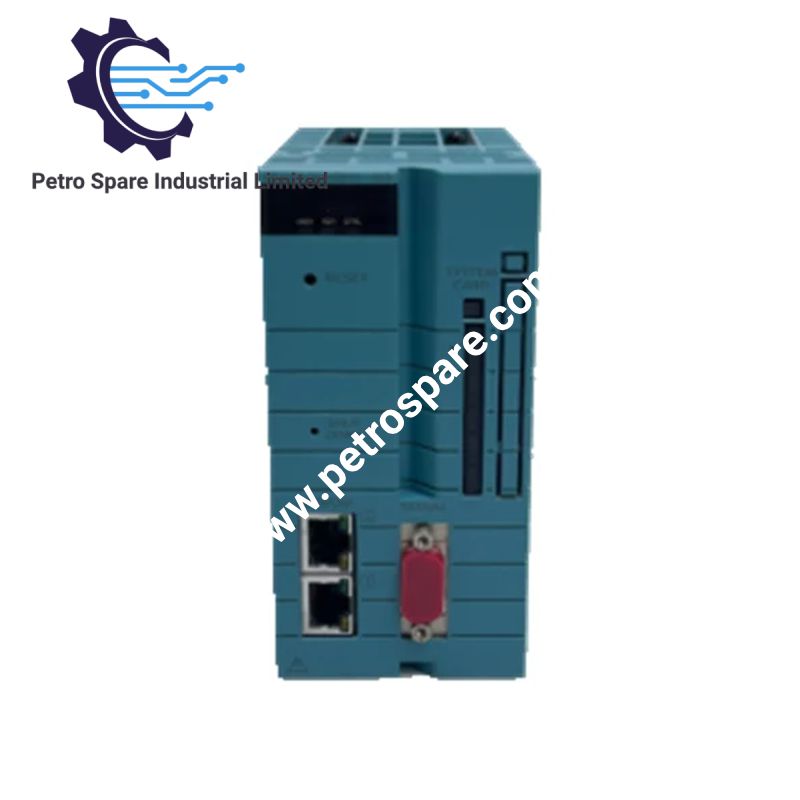


NFCP100-S05
Description
Description
The Yokogawa NFCP100-S05, based on the NFCP100 FCN CPU module, executes real-time control programs and manages communication between the controller and its I/O modules through the dual SB bus interface. It provides Ethernet connectivity, ECC-protected memory, serial communication and CPU duplexing capability for Yokogawa FCN autonomous controller systems.
Suffix Breakdown & Model Matrix
According to Yokogawa's official FCN-100 hardware documentation, the model designation is structured as follows:
| Model Segment | Description |
|---|---|
| NFCP100 | FCN CPU module |
| -S | Standard type |
| 0 | Fixed suffix code |
| 5 | Basic type without explosion protection |
The NFCP100-S05 is the standard, non-explosion-protected CPU configuration. It should not be confused with the S06 version, which includes the ISA Standard G3 option.
Hardware Specifications
| Parameter | Specification |
|---|---|
| Model | NFCP100-S05 |
| Brand | Yokogawa |
| Product Series | STARDOM FCN-100 |
| Product Type | FCN CPU Module |
| Origin | Japan |
| Processor | MMX-Pentium, 166 MHz |
| Main Memory | 128 MB ECC |
| Static RAM | 1 MB ECC, battery-backed |
| System Card | 1 slot |
| Ethernet Interface | 2 ports, 10/100 Mbps |
| Ethernet Standard | 10BASE-T / 100BASE-TX |
| Ethernet Connector | RJ45 |
| Serial Interface | 1 x RS-232-C, 9-pin male D-sub |
| Serial Baud Rate | 0.3 to 115.2 kbps |
| I/O Interface | Duplex-capable SB bus |
| Supply Voltage | 5 VDC +/-5% |
| Maximum Current Consumption | 1.8 A |
| Maximum Calculated Power | 9 W |
| Battery | 2700 mAh lithium |
| Duplex Configuration | Supported |
| Weight | 0.7 kg |
| Dimensions | 65.8 x 132 x 145.7 mm |
| Occupied Slots | 2 |
| Operating Temp | 0 to 55 deg C (FCN system installation condition) |
| Protection Rating | IP20 (FCN system installation condition) |
| RAS Functions | Watchdog timer, temperature monitoring and diagnostics |
Specifications are based on Yokogawa GS 34P02Q12-01E. The 9 W figure is calculated from the specified maximum 5 V supply current.
FCN CPU Architecture and Communication Interfaces
The NFCP100-S05 executes real-time controller applications under an operating system supporting IEC 61131-3-compliant programming languages. It also supports Java virtual machine operation.
Its communication architecture consists of two Ethernet ports and an SB bus interface:
- Ethernet: Two independent physical RJ45 interfaces support 10BASE-T and 100BASE-TX connections at 10/100 Mbps.
- SB bus: Provides the local communication interface between the CPU and FCN I/O modules. The bus supports duplex configuration.
- RS-232-C: Provides asynchronous, full-duplex serial communication through a 9-pin male D-sub connector.
- Memory protection: ECC is implemented in both the 128 MB main memory and 1 MB static RAM.
- RAS monitoring: Hardware diagnostics include watchdog and temperature monitoring functions.
The CPU can operate in a duplex configuration. When CPU modules are configured redundantly, the RS-232-C serial port cannot be used. This restriction must be considered when assigning maintenance and communication interfaces.
Frequently Asked Questions (FAQ)
Q: Does the NFCP100-S05 support hot-swapping?
A: Yes. Yokogawa specifies hot-swappable modules for the FCN-100 hardware platform. Replacement procedures must follow the system configuration and applicable maintenance instructions.
Q: Can the RS-232-C port remain operational in a redundant CPU configuration?
A: No. The RS-232-C serial interface is unavailable when CPU modules operate in a duplex configuration. Ethernet should be considered for communication requirements in this arrangement.
Q: What is the maximum CPU power consumption?
A: The specified supply is 5 VDC +/-5%, with a maximum current consumption of 1.8 A. The corresponding calculated maximum power is 9 W. Verify the available backplane power capacity before installation.
Field Installation Guidelines
1. Mounting: Install the CPU in the designated two-slot position of a compatible FCN base module. Verify the base module configuration before insertion.
2. Power supply: Confirm that the backplane provides the specified 5 VDC supply within the permitted voltage tolerance.
3. Ethernet wiring: Connect the RJ45 interfaces using suitable industrial Ethernet cabling. Maintain separation from high-voltage and motor power cables.
4. Serial communication: Verify RS-232-C pin assignments and communication settings before connecting external equipment. Do not plan to use this interface in a duplex CPU configuration.
5. Grounding and shielding: Follow the Yokogawa system grounding instructions. Avoid uncontrolled shield connections that may introduce ground loops.
6. Environmental conditions: Maintain the FCN installation environment within the specified operating temperature and humidity limits. The published system conditions include 0 to 55 deg C and 5 to 95 %RH without condensation.
7. Startup verification: Check the HRDY, RDY and CTRL indicators for CPU hardware, system and control status. Check LINK and ACT indicators to verify Ethernet connectivity and traffic.
8. Redundant configuration: Confirm CPU model compatibility, duplex configuration and SB bus arrangement before commissioning.
Product Benefits
Product Benefits
- 100% genuine products in stock with fast delivery. Learn more...
- 30-day return policy for quality assurance. Learn more...
- 12-month warranty for peace of mind. Learn more...
Reviews
Reviews