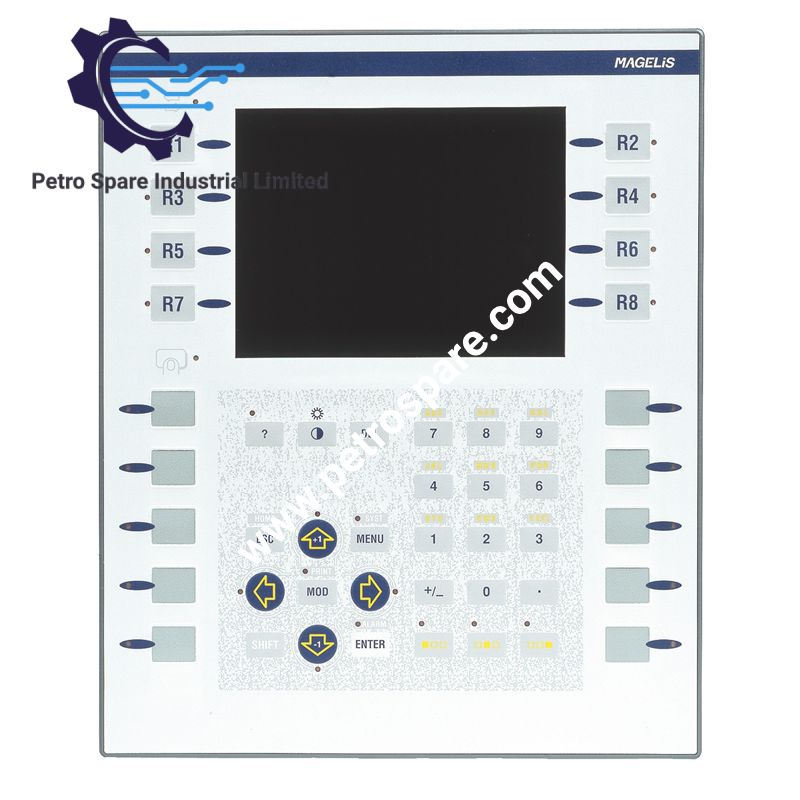


XBTF032310
Description
Description
Configured for operator interaction and machine status visualization in Schneider Electric MAGELiS HMI systems, the Schneider Electric XBTF032310 (XBTF032310 touchscreen HMI terminal) provides a 5.7-inch resistive touchscreen interface with a 320 x 240 pixel color LCD. It operates on a 24 VDC supply, consumes 35 W, and supports 256 display colors. The front panel is rated IP65, while the rear panel is rated IP20.
Hardware Specifications
| Parameter | Specification |
|---|---|
| Model | XBTF032310 |
| Brand | Schneider Electric |
| Product Line | MAGELiS |
| Product Type | Touchscreen HMI Terminal |
| Weight | 1.81 kg |
| Dimensions | Not specified in the available documentation |
| Display Type | Backlit color LCD |
| Display Size | 5.7 inches |
| Resolution | 320 x 240 pixels |
| Color Support | 256 colors |
| Touchscreen Technology | Analog resistive |
| Rated Supply Voltage | 24 VDC |
| Power Consumption | 35 W |
| Dynamic RAM | 2.5 MB |
| Expansion Slot | 1 x Type III slot for PCMCIA communication |
| Front Panel Protection | IP65 |
| Rear Panel Protection | IP20 |
| Operating Temperature | 0 to 45 deg C |
MAGELiS HMI Display and Electrical Interface
The XBTF032310 uses an analog resistive touchscreen to register operator input. Its backlit LCD renders process information, machine states, and configured operator interface screens at 320 x 240 pixels with support for 256 colors.
The 24 VDC supply powers the terminal, with a specified power consumption of 35 W. The front-panel IP65 rating applies to the installed front interface under the manufacturer's specified mounting conditions. The rear enclosure has an IP20 rating and requires protection appropriate to the installation environment.
The terminal includes 2.5 MB of dynamic RAM and one Type III PCMCIA expansion slot for communication-related hardware. Compatibility with specific communication cards and host controllers must be verified against the applicable MAGELiS hardware documentation.
Frequently Asked Questions (FAQ)
Q: What power supply does the XBTF032310 require?
A: The specified rated supply voltage is 24 VDC, and the listed power consumption is 35 W. Confirm supply capacity, polarity, and wiring against the terminal's hardware documentation before energizing the unit.
Q: What are the display and touchscreen specifications?
A: The terminal has a 5.7-inch backlit color LCD with a resolution of 320 x 240 pixels and support for 256 colors. Touch input uses analog resistive technology.
Q: Can the XBTF032310 use expansion communication hardware?
A: The terminal has one Type III PCMCIA expansion slot intended for communication hardware. Verify the required card type, driver support, and compatibility with the connected controller before installation.
Field Installation Guidelines
- Panel mounting: Install the terminal in a panel cutout that conforms to the manufacturer's dimensional drawing. Check the mounting hardware and gasket seating before securing the unit.
- Environmental protection: Maintain the specified front-panel sealing conditions to preserve the IP65 rating. The rear panel is rated IP20 and must be installed in an enclosure suitable for the surrounding environment.
- Power wiring: Connect a regulated 24 VDC supply using the terminal's documented power terminals and polarity. Verify wiring and protective grounding requirements before applying power.
- Signal routing: Route power wiring separately from high-noise motor and switching circuits where practical. Follow the manufacturer's grounding and electromagnetic compatibility instructions.
- Communication expansion: Confirm PCMCIA card compatibility and required communication settings before inserting expansion hardware. Isolate power before installing or removing components unless the manufacturer's documentation explicitly permits energized replacement.
- Commissioning: Inspect the display, touchscreen response, supply wiring, and controller communications. Verify the configured screen layout and operator input functions before placing the terminal into service.
Product Benefits
Product Benefits
- 100% genuine products in stock with fast delivery. Learn more...
- 30-day return policy for quality assurance. Learn more...
- 12-month warranty for peace of mind. Learn more...
Reviews
Reviews