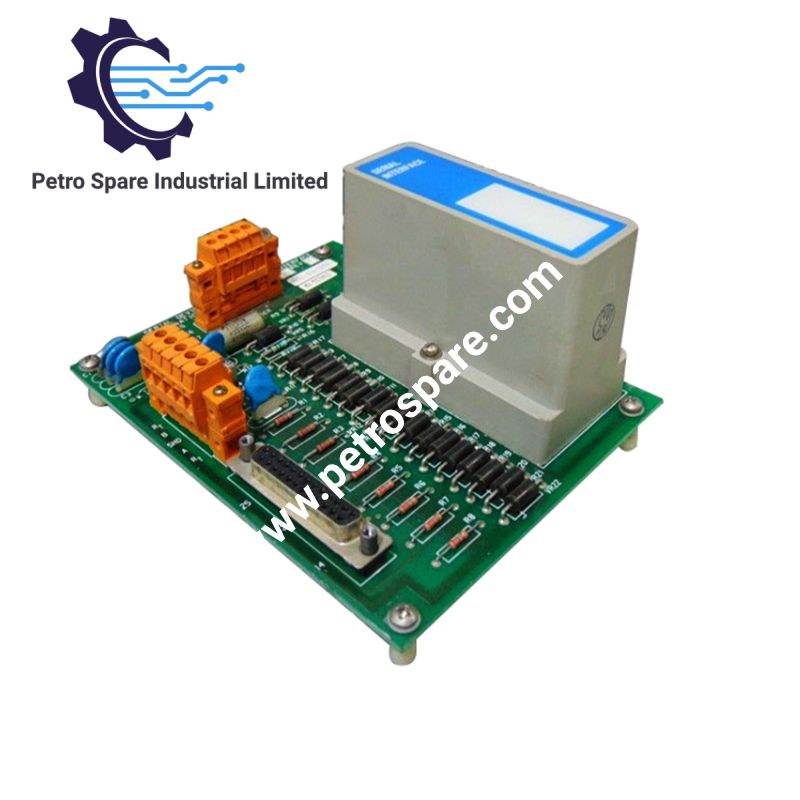


MU-TSIM12 51303932-426
Description
Description
The Honeywell MU-TSIM12, also identified as the MU-TSIM12 Serial Interface FTA Modbus I/O Processor, provides bidirectional serial communication between the Honeywell APM/HPM control system and Modbus RTU-compatible field devices. It supports EIA-232 and EIA-485 interfaces, configurable baud rates and parity, and structured data transfer into Boolean, numeric, and string arrays.
Hardware Specifications
| Parameter | Specification |
|---|---|
| Model | MU-TSIM12 |
| Brand | Honeywell |
| Product Type | Serial Interface FTA Modbus I/O Processor |
| System Compatibility | APM/HPM |
| Protocol | Modbus RTU |
| Physical Interface | EIA-232 or EIA-485 |
| Supported Devices | Multivendor qualified Modbus-compatible devices |
| Devices per SI | 2 FTAs per SI |
| Devices per FTA | Up to 15 devices |
| Maximum EIA-232 Distance | 15 m, 2500 pF maximum cable capacitance |
| Maximum EIA-485 Distance | 1.2 km (4000 ft.) |
| EIA-485 Drops | 15 maximum |
| EIA-485 Common-Mode Operation | 250 VAC RMS continuous |
| Transmission Mode | Asynchronous, bidirectional; EIA-485 half-duplex only |
| Selectable Baud Rates | 1200, 2400, 4800, 9600, 19200 bps |
| Data Format | 8 data bits with programmable 9th bit |
| Parity | None, odd, or even |
| Stop Bits | 1 |
| Function Codes | 01, 02, 03, 04, 05, 06, 08, 16 |
| Message Response Timeout | Configurable; default 1.5 seconds |
| Intermessage Stall Time | Minimum 3.5 character times |
| Data Quantity per IOP | 16 points per serial channel |
| Data Types | Booleans, real numbers, signed integers, ASCII strings |
| Surge Withstand Capability | ANSI/IEEE C37.90.1-1978 |
| ESD Protection | IEC 801.2 |
| Power Adapter-to-FTA Distance | Internal cabinet cable or external cable up to 300 m (1000 ft.) |
Modbus RTU Communication and Data Mapping
The MU-TSIM12 supports serial communication with Modbus RTU devices over EIA-232 or EIA-485 physical interfaces. Communication parameters include selectable baud rate and parity, one stop bit, configurable modem control, and configurable device addressing.
Supported function codes include:
- 01, 02: Read coil and discrete input status.
- 03, 04: Read holding and input registers.
- 05, 06: Write single coil and single register.
- 08: Diagnostics.
- 16: Write multiple registers.
Each serial channel provides 16 points organized as arrays in the APMM/HPMM. Depending on the selected data representation, a point can access 512 Boolean flags, 16 real values or 32 integers, 64 numeric diagnostic-counter values, or character strings in the supported lengths and quantities.
Frequently Asked Questions (FAQ)
Q: Which physical interfaces are supported by the MU-TSIM12?
A: The interface supports EIA-232 and EIA-485. EIA-232 uses separate transmit, receive, and modem-control signals. EIA-485 uses a two-wire differential data pair and operates in half-duplex mode.
Q: What are the maximum serial cable distances?
A: The maximum EIA-232 distance is 15 m, subject to a maximum cable capacitance of 2500 pF. EIA-485 supports up to 1.2 km (4000 ft.). The external cable between the power adapter and FTA can extend up to 300 m (1000 ft.).
Q: How many Modbus devices can be connected?
A: The documented configuration supports two FTAs per SI and up to 15 devices per FTA. EIA-485 supports a maximum of 15 drops.
Field Installation Guidelines
- Verify the MU-TSIM12 interface selection and confirm that the field device supports Modbus RTU.
- Configure baud rate, parity, device address, and response timeout to match the connected device.
- For EIA-232, observe the specified cable distance and capacitance limits. Verify TXD, RXD, and any required modem-control signal connections.
- For EIA-485, maintain correct differential-pair polarity between Data+(B) and Data-(A). Connect the cable shield and protective ground according to the system grounding design.
- Route serial communication cables separately from high-voltage power and switching conductors where practicable. Avoid ground loops and follow site-specific EMC and grounding requirements.
- Verify device addressing and ensure that no more than the specified number of devices is connected to each FTA.
- Check communication diagnostics, response timeouts, and exception reporting after installation.
Product Benefits
Product Benefits
- 100% genuine products in stock with fast delivery. Learn more...
- 30-day return policy for quality assurance. Learn more...
- 12-month warranty for peace of mind. Learn more...
Reviews
Reviews